Record Guide
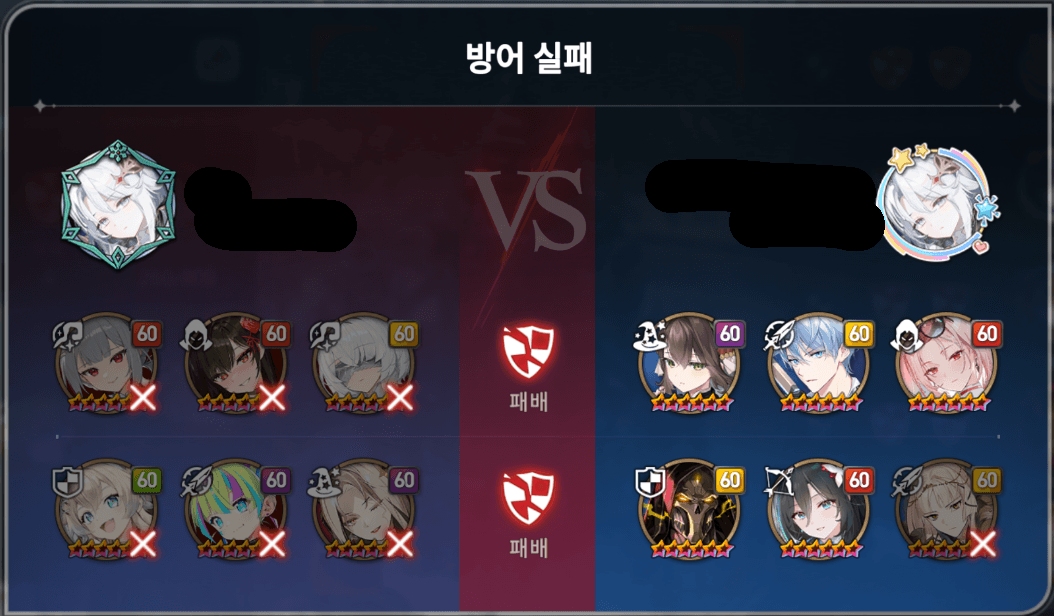
You do not need to hide player names. The result title, hero portraits, and win/loss icons should remain visible.
Upload this kind of image
Use the guild war battle result screen shown after a fight. Recognition works best when the result title, both teams, all hero portraits, and the center result icons are visible together.
Good images
- The title shows a result such as attack success, attack failure, defense success, or defense failure.
- Both teams are visible with all hero portraits across two rows.
- The center win/loss icons and row results are not cropped out.
- The full result panel fits inside the screenshot and is not heavily downscaled.
Avoid these images
- Hero portraits are cut off at the edge of the screenshot.
- Only player profile portraits are visible without the battle result hero list.
- Chat, notifications, or other UI covers the title or hero portraits.
- The image is too blurry or compressed to distinguish portraits and level badges.
Upload flow
- 1Capture the battle result screen.
- 2Upload the image from the Record tab.
- 3Review the automatic candidates. You do not need to manually correct wrong heroes.
- 4Save the row so it can be reviewed and reflected in statistics.
Notes
- Dimmed defeated heroes and red X overlays are supported.
- Skins or heroes with few samples may still be misrecognized at first.
- Corrected results can be reused as data to improve future recognition.